📒 Personal Lists

As you work through textbooks, or a show, novel, you may want to keep track of what you’ve seen. Maybe to review for later, or to track your progress.

Now you can with Personal Lists :slight_smile:

As of today these lists are private. They’re also only for organizing.

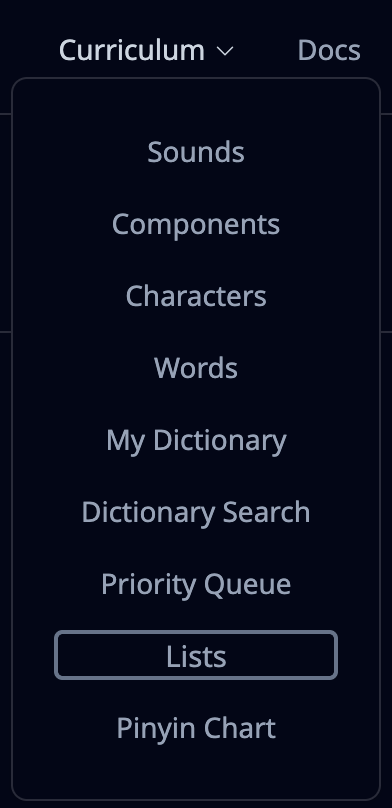
You’ll find your lists under the Curriculum dropdown:
List Creation

Then you can easily create your first list:

The color is supposed to help you distinguish between lists when adding items.

Individual Adding

To actually start filling in your list, you have two options: you can either add them as you browse around the curriculum, or you can paste a list. Let’s first add some by browsing around:

Note that you can easily toggle adding/removing an item.

I only demonstrated characters above, but a list can track any item within HanziHero, including sounds & components & dictionary items, should you have that enabled.

Bulk Import

Individually adding items works for when you’re starting from scratch, though perhaps you already have a list you’re referencing elsewhere and want to bulk import. Let’s try that out instead.

You should be generally able to paste in anything into the import and it’ll work out. Just make sure that the character(s) are separated by spaces, commas, or newlines.

You’ll get a preview to confirm how much of the import text actually worked, so you don’t have to spend time figuring out what went wrong or why only half of the items showed up!

Closing

I hope you find these useful for organizing and keeping track. Give them a try and let me know what we can do to make them even more useful for you :slight_smile:

Happy studying!

6 Likes

This looks awesome 
 but:

Does this mean the lists have nothing to do with learning queue? Is there a “bulk add to queue” for now at least? If not can there be? I imagine (or hope) that in future these lists can become you’re queue but even just the ability to bulk add the list to my queue would satisfy 90% of what I personally am after.

One other thing that would work wonders for this would be having dictionary items just be part of your learning queue, not an extra post step. Then a list → bulk add to queue → study as normal == learning from a list in the list order is everything I’ve previously requested!

Look forward to seeing this expanded in future (and eventually leading to public lists that people can share etc).

2 Likes

I just tried making this into a list:

https://www.jiong3.com/gradedwatching/Lists/Jiong3comGradedWatchingBasic1kWords.pleco.txt

After extracting just the word column, the import added most of them just fine, but fails to add a few obviously valid words including 结果 
 that is clearly a valid entry item in the dictionary Login | HanziHero

1 Like

Ah! I forgot to mention. For V1 if a dictionary item has multiple pinyin definitions, then the import skips over them. Because I figured it’s better to fail it than to add the one with the wrong pinyin

A better solution would be nice
 I’m open to suggestions :thinking:

Yes, I think having lists interact with the queue is one of the next improvements to make it truly useful!

It’s an interesting suggestion to perhaps retire the “Priority Queue” and instead have something like “Prioritize lists”!
That sounds like a great simplification :thinking: or something like it. I wasn’t sure how to handle the bulk prioritize yet, but I figure step 1 is at least having lists to begin exploring what is needed.

Yes, providing lists people can look up I think is another way to make it a lot more valuable

Another thing to explore is providing “official” lists so anyone coming into HanziHero studying A Course in Contemporary Chinese for example can just click “study this” and then their queue works/easy to track progress :slight_smile:

3 Likes

While probably somewhat of a paint to write the UI for, it’d be great if it could just ask me. The import box would have a “automatically found [X/Y]” as it does now, but a new “[Z] uncertain items remaining” section at the bottom, then if any issue items the “Add X items” button becomes a “Resolve Next Item”. Click it you are shown the first issue, pick right pinyin/definition, hit next item and keep going until everything is resolved then you get the existing “Add X items” button to finalise the list. So it just takes you through the problem items and lets you pick a resolution.

Being able to find the item and add it manually back in is fine - but is there any way to re-order the list? I tried to re-add my issue items but they all went to the end. Which is not terrible, but being able to put them back into their correct order would also be fine fallback.

Yeah I agree do that! It’s exactly what I want so it’s clearly a great idea :stuck_out_tongue:

Yep - definitely have both. Start with public lists so community can build out a whole backlog of it without responsibility falling to you guys, but then just publish your own as you feel like it (and then just have some neat branding on any official list published by the “HH Team”!

1 Like

I’ll have to think about how exactly it’ll go about this prompt. Stepping through the “resolves” sounds like it’d work, I’ll play around with it :slight_smile:

This is another UX issue I’m still thinking about. Depending on how lists evolve (and how they interact with the prioritization, among other things) I’m curious what’s the best way to provide the function. With priority queue it was clear one would either want it first or last, but with lists I wonder how common it is to want to insert something in the middle of it, for example.

It could be just drag and drop, but I wouldn’t be sure how it’d work on mobile. Another option is select item(s) and then select an item elsewhere in the list you want to prepend/append to. This option would work quite well on mobile :thinking:

1 Like

I agree that some further list-sorting tools could be useful. Relatedly, being able to filter lists with the same options that already exist for official parts of the curriculum (e.g. being able to sort a list to show only unknown items or only items marked HSK Lvl 2, etc.) would be helpful.

I’d also appreciate the ability to auto-populate a list with related characters if I add a word, similar to how that functions for priority queue now when that option is enabled.

A trickier idea to implement would be improving user ability to gauge their progress in a list. This could be a simple progress bar at the top of the list, but I get that between this and the filters that I am suggesting a much more cluttered UX. Another option would be choosing certain lists to pin to the homepage so that they get their own progress wheel, same as the HSK Level wheels that are already there.

2 Likes

Currently that function is due to how our priority system works; I was hoping to move toward having a “Preview” prompt for Words & Dictionary Items in the Lessons, so any Characters that are needed will be auto-queued if you click “Learn”, and thus get rid of the group prioritization words/hanzi currently do. But I can see the appeal from a tracking progress perspective
 :thinking:

Yeah, I do think it’d be cool to have progress tracking. The idea of having it mirrored somewhere on the Dashboard is pretty great! It will be more stuff on the page, but being able to see your progress is pretty fun.

As for the filters, there’s no strong argument to omit them. I was wondering if there’s another way to present them, depending on how the other List features look. Will have to play around with it :slight_smile:

1 Like

If we could

  1. Click an extra study review button while viewing a Custom List
  2. Have an endpoint .csv to copy out our list.

these would be the best things literally ever.
:folded_hands:t3::folded_hands:t3:

Thank You!!!

3 Likes

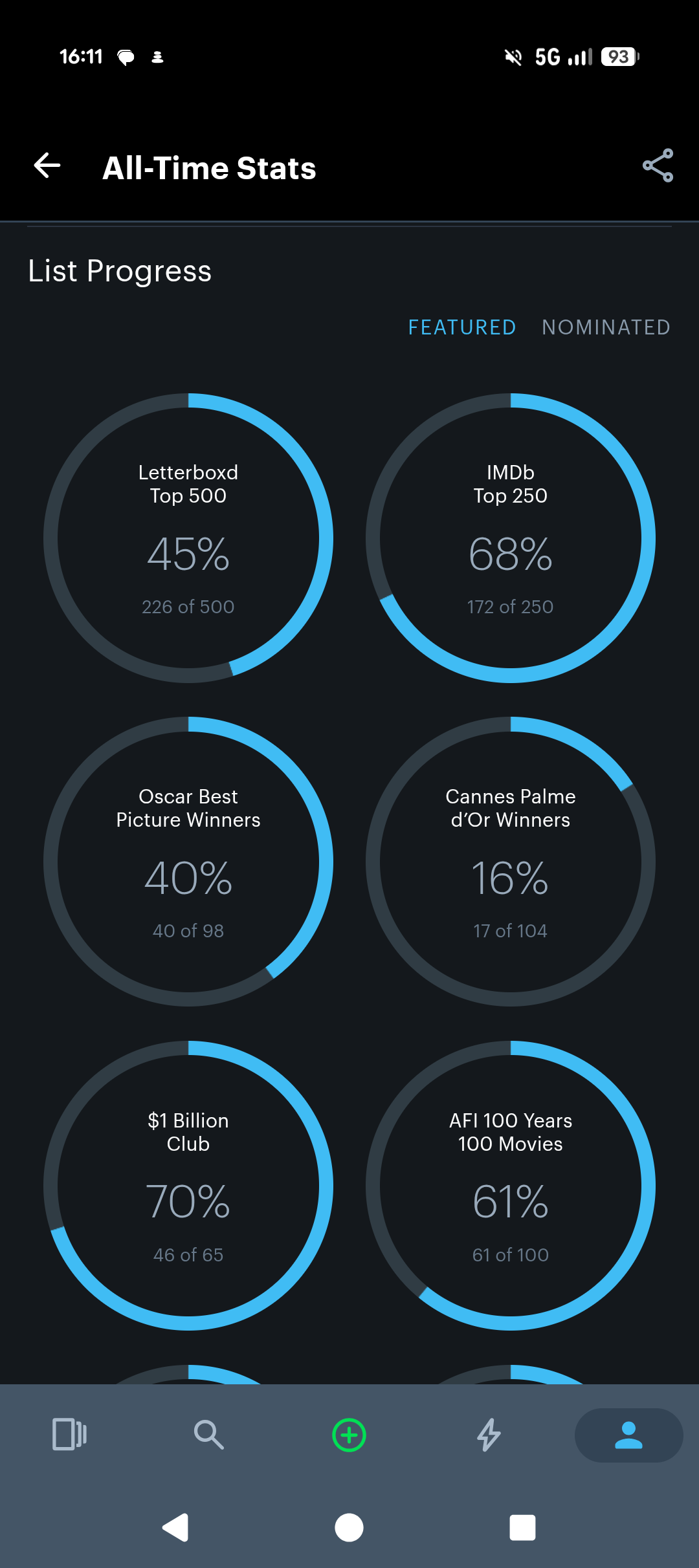
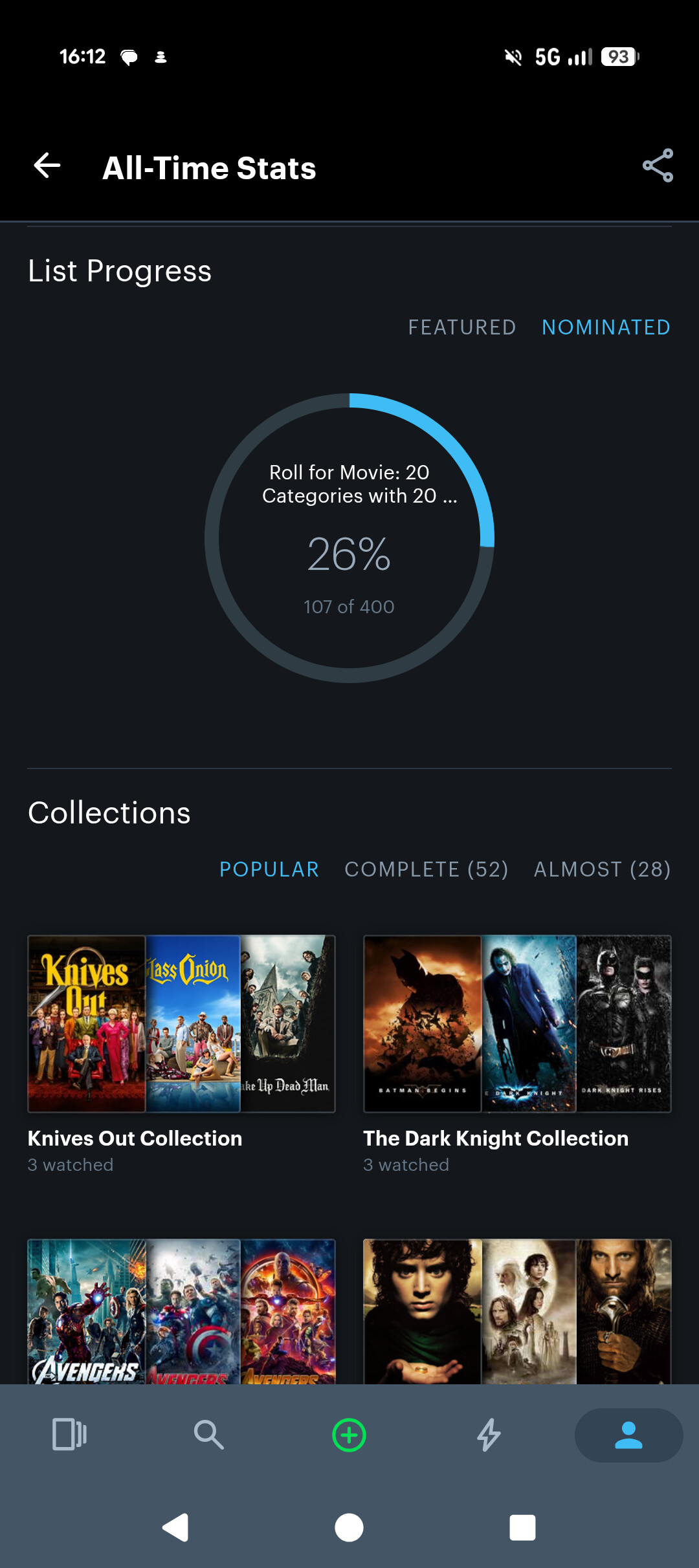
An design example of a solve for the homepage tracking that I know from Letterboxd (think Goodreads for movies) is having a custom tab to pin lists to in order to display their progress bars. Here’s what that looks like.

Letterboxd sitewide “featured“ lists progress bars

Letterboxd customizable “nominated“ list progress bars that you can pin lists to, just a click away in the upper right

2 Likes

Hi @phil!

A couple of thoughts now that I’ve had a chance to give it a spin.

Would be really helpful (and hopefully not too large of a lift)

  1. List ordering by learned/not learned, or the same ordering functionality available in other curriculum views.

    I realize the current cards already visually indicate learned vs. not learned status (using the white diagonal striping), but I’m specifically referring to the ability to sort or group them. Sorting by SRS status would probably cover this use case as well.

  2. Filtering and sorting options similar to the Characters and Words curriculums.

    It would be great to have filters such as:

    • Status
    • HSK level
    • SRS status

    And, of course, the ability to sort by those fields.

Nice to have (definitely a bigger lift)

When pasting a list, especially since I’d personally be pasting long lists, a couple of enhancements would be really useful:

  1. Show the full list of items that were not added.

    Maybe this could be displayed:

    • in a side panel,
    • in a log,
    • or via a one-time popup with the option to copy the entire list before closing it.

    For example, today I pasted a list of 165 terms, and roughly 110 were added. I’d love an easy way to see all of the terms that weren’t added without having to manually figure it out myself.

    Right now, the UI shows a truncated preview of terms that won’t be added, which is completely understandable from a design perspective, but it cuts off after about 10-15 entries with no way to expand the list.

  2. Prompt users whether they want to add new (previously unlearned) items to the queue.

    I know I’m reiterating what @kaysik mentioned, but I think the repeated requests suggest there’s real demand for it.

    Personally, I don’t think the initial insertion order matters too much since we can already reorder the queue afterward. I’d mainly want the ability to add everything in one step.

    Bonus “would-be-nice” feature: after confirming the items, ask whether they should be placed at the front or back of the queue.

Overall thoughts

I do appreciate that the prioritization options already exist, and I like the list concept overall because it gives me a way to keep related items grouped together while still prioritizing them however I want.

That said, adding filtering, sorting, and ordering capabilities would make lists feel much more powerful and purposeful. To me, they could become useful not only for grouping content but also for things like:

  • goal tracking,
  • maintaining focused subsets of a larger queue,
  • and creating custom “views” into a user’s learning pipeline.

Overall, I think those additions would make the feature considerably more dynamic and versatile.

2 Likes

@phil Either you’re super super fast, or I just didn’t notice it the first time! I see the filter dropdowns now. If you just added it, thank you! If they were already there, so sorry I didn’t notice them :joy:

One more thing, I don’t see a way to remove an item from a list. That’s all. Thank you for your hard work as always!

1 Like

Yes, they were just added :slight_smile:

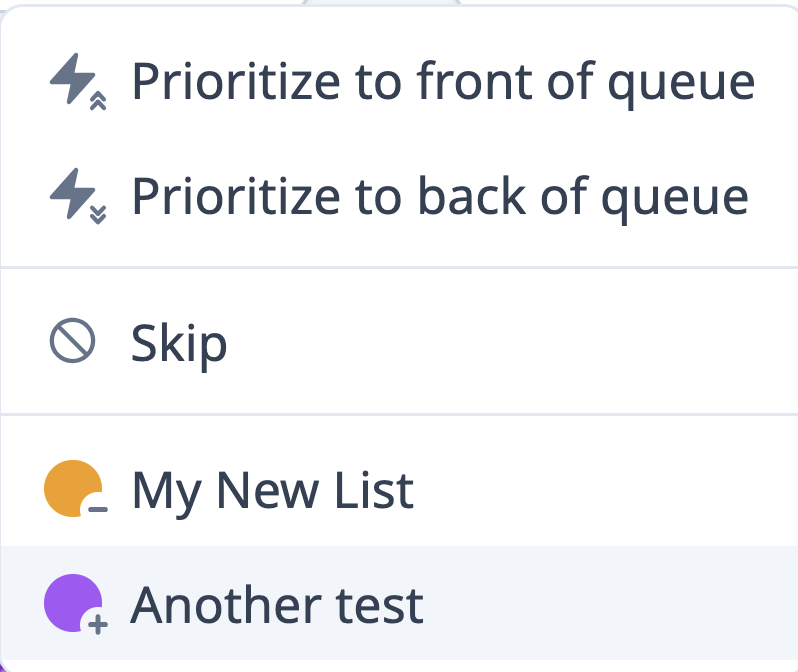
There is a small “+” and “-” next to the List’s color for adding/removing when you click on the tile action dropdown.
For now I’ve bumped the stroke width on both of them, in hopes that it makes it easier to see:

I hope that helps, but if not there are other variations we can try!

2 Likes

Is it possible to do extra study reviews from the lists? like just add the extra study button? :folded_hands:
I know I’ve already mentioned this, but I seriously love the lists feature and am super anxious to be able to do some extra study focused reviews from my items I struggle with.

I did some inspect and saw the JS event on the ‘Launch’ button sends the subject-tile-# as list of url args to the ./extra-study/.../reviews? url
 I don’t even want the pop-up to filter what constructs the list, just the extra study all in list by default. is it easy to repurpose the extra-study/reviews url like that?

2 Likes

Added :slight_smile: it’s the little book icon top right. Very basic for now, but would be fun to expand the options here!

This is now supported as well! In the same top right area. There is bulk unprioritize button at the moment
 but a more advanced “bulk actions” tool seems imminent. Hopefully no one accidentally prioritizes too much in the meantime :sweat_smile:

There’s now a section of the import preview which renders all dictionary items with multiple pinyin. Each is a dropdown that shows both the pinyin and the definitions, so you can select which one you like.

After some toying around, I found having some sort of “progress widget” at the top w/ the SRS distribution not too invasive, thanks for the suggestion!

Of the items that weren’t processed within the Preview, you can now expand to see the entire list or also click a “Copy” button to copy them to your clipboard :slight_smile:


There are feature requests/ideas here I’m still working & thinking through, thank you all for the wonderful feedback!

4 Likes

I just tried out adding a list (the same list), I was able to use the definition selection, and able to expand and copy the terms, and successfully bulk prioritized the list & added to front! :white_check_mark: :white_check_mark: :white_check_mark: :white_check_mark: :white_check_mark: Super awesome work, thank you!!

1 Like

this feature is really amazing! It can also be used to address an older topic “visually similar characters”. I started to make such a list using your new feature. Happy to share this list with others (if i can find the export button).

3 Likes

I’m doing the exact same thing, creating a list of characters I keep commonly mistaking for other characters. Adding the extra study to lists is super handy to help address this! It’ll be cool to see what other ideas people come up with :slight_smile:

3 Likes

The way I’ve been using the list feature most frequently is having a “dictionary wishlist” and an idioms list. When I look up a word and get really tempted to add it to my priority queue I have somewhere else to park it now instead :joy: Cuts down on impulsive jumps into words/characters I don’t actually need to know right now.

2 Likes