So what I’ve been working on lately is a browser extension. The hope is that it makes accessing media a lot easier/frictionless. Here is what I have working so far.
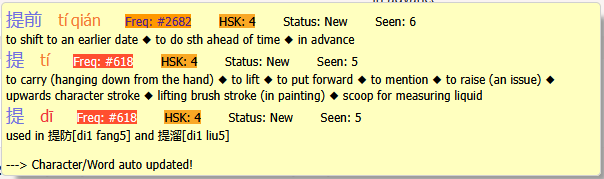
First, shift+hover to lookup under mouse, and then you get a popup:
The popup gives you the definition and quick access to adding to lists, prioritization, skipping, etc. You can also drill down into characters for every dictionary item and word.
Beyond shift+hover, you can also annotate the page:
This’ll let you see word boundaries and also, at a glance, see how much you actually know. You get a percentage-known with the floating icon on the bottom right.
It’s color-coded according to SRS stage. Originally it was all highlighting, but it was too distracting compared to doing underlines In any case, you can tell from the colors of the page not only if you ran into something, but how well you know things in general on the page.
There’s also support, as of today, for YouTube:
When you hover over the extension-added subtitles, it pauses the video and resumes when you’re done. Right now it only supports videos that actually have subtitles.
There’s more polish to be done before releasing it, though I’m curious if others would find this useful and also thoughts on other features it could have
Things that I have that you don’t (not that I think you have to have them, just things I’ve found useful):
The frequency level of each word/character. There are some quite common things that aren’t in HSK so the HSK level alone wasn’t enough for me (like say 混蛋 - not in the HSK, but top ~500 in subtitles so still worth knowing).
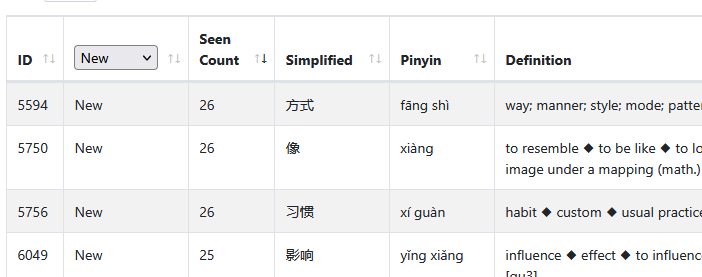
Seen count: I log everything I mouse over to look up (a “look up” in this case is if I stay on a word for more than 1 second, so it doesn’t log things as I’m moving my mouse to a word, only loggs things I actually hover on). Then I take that list, and sort it by the number of times I looked it up because: That’s something I see regularly and don’t know (since I keep looking it up). It becomes a personalised study order list.
But just in general being able to lookup stuff with a mouse over dictionary is basically mandatory for me. Being able to quickly send items to HH would also be great. In my (quite unique) case, unless you also start logging mouse over lookups I probably wouldn’t stop use my own version (although if you have an easy to hit endpoint for adding items, then I’d totally use it). But in a general “do you think this is useful?” I’m 100% yes yes yes!
Oh on the subtitles, another thing mine does that I really like is any time a new subtitle appears, it logs it to a side panel with a timestamp so that you can click it to replay the same line over and over:
(Also auto-pauses the video any time it shows the popup)
Since it just works off watching the subtitle box, it’s not 100% accurate, but I just minus 1 second off when my script detected it popping up and it’s good enough lol (also works with Netflix and Amazon … mostly … sometimes they change their DOM and it breaks but it’s mostly ok).
The extension sounds amazing! I’ve been mulling over how to go about gradually taking what I’ve learned and applying it to reading, in time. Figured I’d eventually need to find some sort of tool or app or something, but this would be much better!
I particularly like the idea of showing how much of the displayed text is currently learned. And any words that keep popping up that, aren’t currently in HH, I can then add myself. To be honest, this all sounds pretty dang cool.
This does sound quite useful. I’m wondering whether, should we implement it, whether to shoehorn it into the current “lists” or just have it be its own concept within the Extension. e.g. you can open the extension to a panel which shows recent lookups and high-frequency lookups
This also looks quite useful! If I recall correctly, YouTube does have this feature as well as “Transcripts” enabled as a button at the bottom of the description. Is this your own inserted element, or are you modifying how the YouTube Transcripts renders? I haven’t tested how the annotation script works on Transcripts (though I imagine it could interact poorly)
The status column only shows new items by default, sorted by Seen Count. The status is either “New” which basically means “not dealt with yet”, “Ignore” which means I don’t care and “Handled” which means I’ve gone and made sure it’s in HH, and found a bunch of sentences to study it’s usage (I find drilling complete sentences containing words I’m unsure of really helps nail them down much better than just studying the word itself more often). Knowing an item in HH doesn’t necessarily mean I understand it’s usage in the CI I’m watching.
This is also just using addon storage - it’s not synced across browsers/computers or anything.
I just inserted my own. I did that because I can then re-use the whole thing for Netflix/Amazon etc. Honestly I’ve given up using the Netflix/Amazon for CI since my level isn’t high enough, but the addon’s setup is generic. It just watches different dom elements on each site to rip the text from, but everything else is generic so it works anywhere. Since it’s just watching for Dom changes, it doesn’t even know about what subtitle language your using or anything - makes the whole thing much simpler. Initially I tried to actually hook it into YT’s subtitle system itself and spend like 2 weeks having it not quite work. The moment I went “well it’s just a div with a specific ID, can I just rip the text out of that when I get a dom changed event for it in JQuery?” And the answer was the whole thing then just worked after 1 more hour despite previous multiple weeks of failure!
The main downside to doing it this way is you can’t “look ahead”. My original goal was to load the complete YT subtitles to then give you a % known like you have on webpages for the video, so you could know if it was worth your time. But with the current system the subtitle has to show up to be logged, so you can’t know what the video subtitles contain until you’ve finished the video. But honestly I haven’t actually cared - you can tell within the first 10-20 seconds of a video if it’s the right level anyway so not a big loss.
That makes a lot of sense. The architecture sounds a lot simpler too, especially since subtitle systems can be complicated. Hooking into YouTube’s has been
Interesting! I can see the merit to providing one’s own subtitle box then, for uniformity across platforms and to also cover platforms which don’t have the feature easily available. Thanks for sharing what you’ve worked out. It seems like, depending on constraints, one can fallback to just-in-time transcripts if full transcripts become too difficult to work with
 In any case, you can tell from the colors of the page not only if you ran into something, but how well you know things in general on the page.