A while ago I mentioned that I love knowing how “useful” a word is and was using the Dong Chinese dictionary to see the little bar graphs of frequency. Well I got annoyed with it since it shows relative frequency, not absolute. It also doesn’t show you word frequencies themselves (just frequency of what word uses a specific character). And I couldn’t find any other easy reference for how frequent a word was. It was annoying - I just want to know if something I see is common or not.
However I’m lucky enough to have the skills to make it happen. So I went and found the official HSK lists, and some frequency lists and made my own. I’ve been using it now for about 6 months and finally decided others might like it too … so I spend the $4 to buy a domain name and now it’s here:
It’s ugly as hell because I put not time into formatting, but it lets you type in Chinese characters/words, and get definition plus a bunch of frequency information. e.g. for 情况 it shows:
It’s super common (coming in 333rd in SUBTLEX, 159th on Beijing list etc), even more so than the HSK level would have you believe. While 用人, the 6th word in the HH word list it shows:
sheeeesh, no wonder I’ve never seen it and find it hard to remember (and have since skipped it after looking it up). One day I might come back to it, but right now I think it’s a waste of my time (there is some value in it as a way to help remember the two characters it contains but as I have no trouble with remembering them without this word it’s value to me is basically zero).
No traditional support since I don’t learn than, and don’t have any frequency lists etc for it - sorry trad learners. But for anyone wanting to look up simplified characters/words hopefully it’s helpful. And let me know if you hit any issues!
I’m curious, what combination of tools (and libraries) did you use? Just general advice or pointers or starting points if you have any. If none, no worries!
My background is data science, so Python, SQL, and R are my everyday bread and butter, I could ease back into C++ and/or Java (feeling bold here), but really for webdev I’d be a newbie.
Lately, I’ve been wanting to make a website app kind of like HanziHero, but for teaching cangjie and sucheng. I’ve been going through an Angular tutorial. I learned a bit of webdev like 10-12 years ago, but obviously a ton has changed since then.
And then something like an SRS and the actual practice/learning application, I’d assume they would have be developed using Flask or something. But really, I think I just have too many options and idk where to start.
Mostly pure HTML, with a small amount of php (there are only like ~300 lines of php code, and most of that is just spitting out more pure HTML so in terms of lines that do actual logic is prob 100 max)
The data is stored in an SQLite database and I query it via php with really simple SQL (there are only 5 simple SELECT * FROM BLAH… queries in the whole thing)
I use a minor amount of CSS to centre some text and add padding to the tables but it’s all inlined because it’s easy and this site is super simple so doesn’t need anything more
I wrote the entire thing in notepad and in total I think it took less than 4 hours. Honestly finding the frequency/HSK lists, formatting them consistently so I could import it into the SQLite database took as much if not more time than building the site itself.
I can send you the source code if you want, and even happy to explain it via email/zoom etc. I think people make web dev faaar more complicated than it needs to be. If you’re building youtube and have a bajillion users, then sure, it does need to be complicated, but for 98% of sites you don’t need any of that junk if you don’t want it. I just do KISS. Browsers render HTML … HTML is just text … I can just write that in any text editor. PHP is just “logic inside of your HTML” so to me is the simplest way to get “html but like I can do stuff dynamically” and I love it. I’ve worked on sites with millions of users running on nothing but HTML+CSS+Php and a database - zero issues.
Other Details:
I don’t even bother to run a local web server since I have hosting already, I just upload my edits directly to the site and test them on the actual server. This means locally there is no setup … I can just start typing.
Technically I don’t use windows Notepad, I actually use Notepad++ because it has an FTP module. This lets you load pages directly from the server and when you hit save it automatically re-uploads it back. This works great with the point above, I just do dev directly on the server. There is no IDE, no projectile file, no installation, no complex setup/config - it’s just a bunch of text documents in a directory. Using windows Notepad + manually uploading your files to the server would be virtually identical to what I do.
If you want your site to be look/feel decent without web design effort then I really love Bootstrap v4 (there is a new v5, but it’s more complicated for basically no gain IMHO). You just include their CSS and javascript straight from their CDN as shown in the example page in the Getting Started` section (no need to download it or anything), then use the right classes on your [div]’s and magically it all looks great. The doc snippets are great - if you want a form or a Navbar on your page, you just copy + paste the closest snippet to what you want and bham it works. They even have entire example sites (like say this one) - you just open it up, right click View Page Source and copy+paste what you need (or the whole thing if you want to start with that).
All the frameworks like React/Angular or whatever - all they’re doing at the end of the day is helping you spit out HTML to a browser … but if you’re site isn’t incredibly complex, then I don’t think the frameworks are very helpful. The part they skip is the part you need to learn when starting and is mostly easy to do … so it’s like “here, lets help you skip the simple but vitally important stuff so you can get confused by the complicated proprietary stuff you probably don’t even need straight away”. I’ve had to use a few in my time, and they serve a purpose on enterprise teams with 10+ devs and separate frontend + backend teams etc …. but I always revert to just html+php with a sprinkling of JS as needed when doing solo stuff … I mean if that combo is good enough for Wikipedia, Facebook and Etsy (all built with PHP) then I’m sure it’s good enough for my meagre requirements.
Having said all that if you’re enjoying Angular go wild, don’t let me stop you, there are infinitely many valid ways to do all this of course. Many people swear by the bigger frameworks. But personally I think if you want your site to “just work” I’d actually avoid all the frameworks etc. Write pure HTML+CSS for a while with dummy static content until you get the look + flow you want. Once you like the dummy layout, then start adding dynamic logic into those pages with php (like querying a database based on a search term). Then when you want to get fancy you can add in some JavaScript for client side logic once you’re server side of php is giving you all the correct info. If you’re ok with Python and SQL, using php for web dev will be a breeze.
Wow, it is a kind of tool I always thought would be super nice to have and it’s amazing you actually made it yourself I used to utilize a combination of Mandarin Word Frequency list and hanziDB, but your page uses data from multiple sources and works flawlessly - really great work!
Wow, MVP! thanks! Very useful to see if one should study a word… I like the way you can click on a character and see all the words it is in, sorted by frequency!
I spent a little over 2 hours and updated the whole thing to use Bootstrap so it doesn’t look like it was built in 1993 (not that there’s anything wrong with that lol!). So this page:
Nice work! Def.will book mark this one. I like the simplicity . Can you add some simple hover functionality like hanzi hero has :). Would help to not have to open a whole new page to just get the meaning/pinyin.And in definitions feels like there are often the surnames as first, but i doubt those specific ones are the common ones?
I can, but also do you not run ZhongWen or Migaku or something? If you don’t, I highly recommend it. I couldn’t stand not being able to look up random characters in youtube subtitles etc lol.
Yeah I hate this too - but I didn’t write the dictionary so I’m just displaying whatever it says. There isn’t way for me to re-arrange it without manually going through every entry … and since there are like 80,000 entries that’s prob not going to happen haha.
Maybe just put characters that have ‘surname’ in it last. I just noticed a bunch of items had a bunch of surnames in them. I guess generally speaking, surnames are not what ppl would be looking for. Anyhows works great – and usually with the context can infer what character-meaning im looking for.


 I used to utilize a combination of Mandarin Word Frequency list and hanziDB, but your page uses data from multiple sources and works flawlessly - really great work!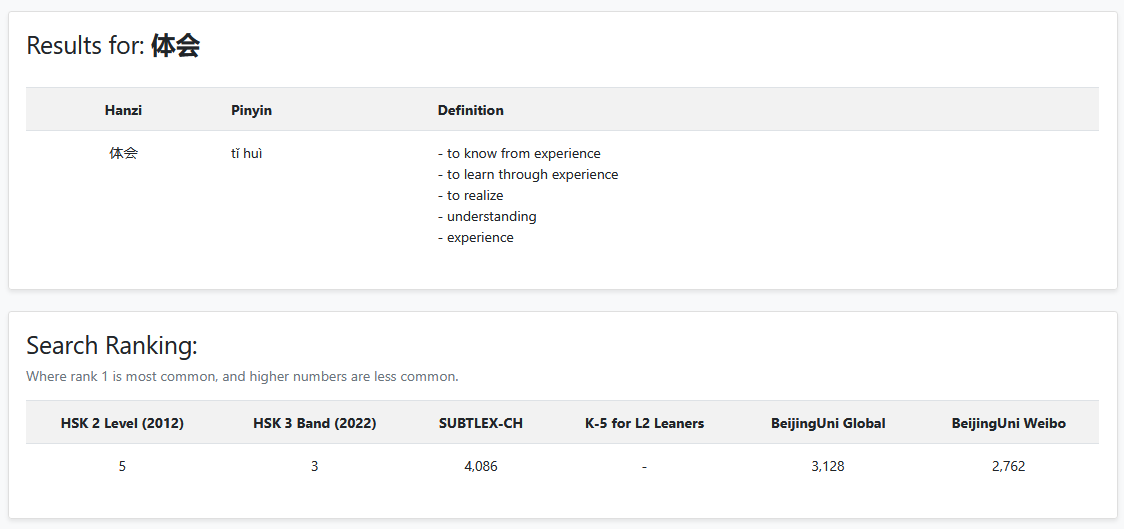
 . Can you add some simple hover functionality like hanzi hero has :). Would help to not have to open a whole new page to just get the meaning/pinyin.And in definitions feels like there are often the surnames as first, but i doubt those specific ones are the common ones?